The life of a quote, from draft to invoice
In short
A quote (devis) always goes through the same steps, in the same order. Each one opens the next. Two of them cannot be undone: issuing the quote and its signature.
The thread
Draft → Issued → Sent → Viewed → Signed → Deposit / Balance → Paid
                                    │
                                    └→ Refused
| Step | What happens | The guide |
|---|---|---|
| Draft | You write the quote. Everything can be changed | Writing a quote |
| Issuing | The quote gets its number and stops changing | Issuing a quote |
| Signature | The customer reads, receives a code, signs or refuses | Getting it signed |
| Evidence | The signed quote and its evidence dossier | After the signature |
| Invoicing | Facture d'acompte (deposit invoice), then facture de solde (balance invoice) | Deposit · Balance |
| Correction | An invoice (facture) is corrected with an avoir (credit note) | Avoir |
| Payment | You record the payments received | Collecting payments |
Where each quote stands
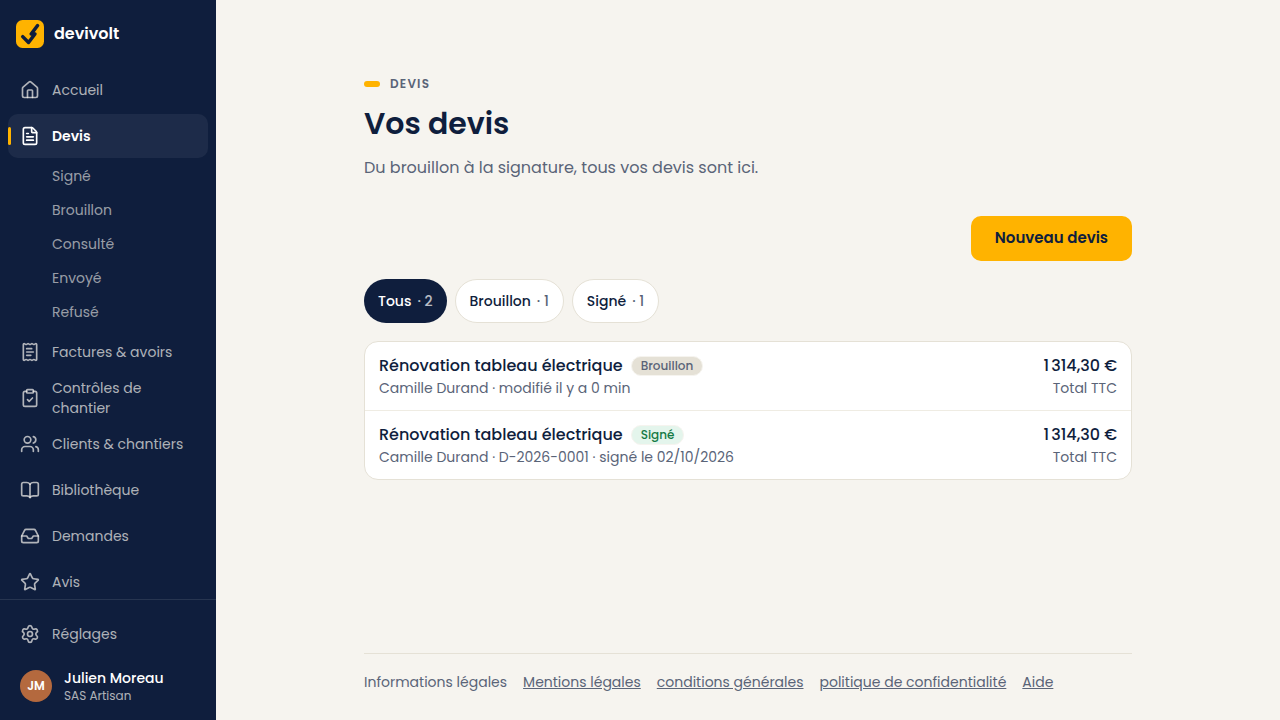
The Your quotes list says it under each row: "edited … ago" for a draft, "sent on…" or "reminded on…" for a quote out for signature, "signed on…" for an accepted quote, and the reason in quotation marks for a refused quote. The chips at the top filter by state.
The two steps with no way back
Issuing. After it, the quote has an official number. It can no longer be changed or deleted. To change something, you duplicate it: see Variants.
The signature. After it, the quote is accepted. If the work changes, you make a new quote.
What happens on its own
- The follow-ups at 5 and 12 days, as long as the customer does not answer.
- The closing of the signature link when the quote's validity ends: the customer sees « Ce devis n'est plus valable » (this quote is no longer valid), and the quote screen shows Link expired.
- Invoices turning "overdue" the day after their due date.
- The site checklist, prepared as soon as the quote is signed.