Getting a quote signed remotely
In short
Devivolt sends your customer a link to a web page. There they read the quote (devis), ask for a 6-digit code by e-mail, tick the acceptance box and sign. They have no account to create and no app to install. You are told as soon as it is signed.
The card: Send to the client for signature, on an issued quote. From a draft, on a computer, Send for signature issues the quote and sends it in the same move.
Sending
- Check the signatory's address. The link and the code go to that address, and to it alone.
- Check the signatory's name: it is the one that will appear on the evidence.
- The link is valid until the "Valid until" date of your quote — 30 days if you have not set one.
- Click Send for signature.
What your customer sees
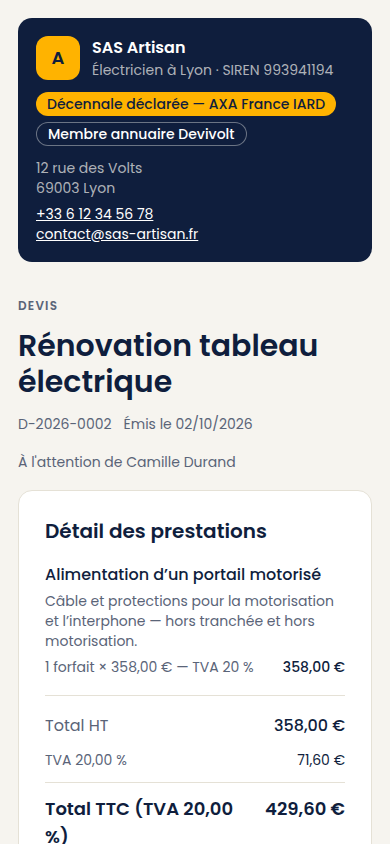
A page in their name, headed by your company (name, city, SIREN — your company registration number —, declared décennale insurance — the compulsory ten-year building liability insurance), then the full quote: the itemized work, the totals, the legal statements and Télécharger le devis (PDF) (download the quote). At the bottom, two blocks: Signer en 2 temps (sign in 2 steps) and Refuser ce devis (avec motif) (decline this quote, with a reason).
To sign, they click Recevoir mon code par e-mail (receive my code by e-mail), type the code (6 digits, valid 10 minutes), tick « J'accepte ce devis, son montant de … TTC et ses conditions. Cette signature m'engage. » (I accept this quote, its amount of … incl. VAT and its terms; this signature binds me), draw their signature with a finger if they wish (optional) and click Signer le devis (sign the quote). The page works on any phone.
To decline, they choose a reason (price too high, lead time, another quote chosen, other reason), can add a detail, and confirm.
Following where it stands
| State shown | What it means |
|---|---|
| Sent, not opened yet | The link is out, the customer has not opened it yet |
| Viewed by the client | They opened the page. A good time to call |
| Signed | Done, with the date |
| Declined | With the reason they gave |
| Link expired | The quote's validity has passed |
My customer cannot sign
From the most common to the rarest:
- They cannot find the code. It arrives in a second e-mail, often in the spam folder. Have them click Renvoyer le code (resend the code) — a one-minute wait between two sends.
- The code expired after 10 minutes. Have them ask for a new one.
- "Ce code a été désactivé après trois erreurs." (this code was disabled after three mistakes). A new code solves it.
- "Trop de codes demandés." (too many codes requested). Five a day is the limit. They will contact you to sign another way: a printed quote signed by hand is still valid.
- The link expired with the quote's validity. Duplicate the quote and send the new version.
If you used the wrong address, use Resend the link with the right one.
What this signature is worth
Devivolt keeps the elements that prove the signature: the e-mail address used, the sending and typing of the code, the time of each step, a fingerprint of the signed document and the signatory's internet address. You can produce this evidence dossier at any time.
Devivolt helps you gather that evidence. It is not a certification body, and it issues no official signature certificate.