Your décennale insurance
In short
Four details to copy from your certificate: the insurer, its address, the area covered and the expiry date. The policy number is optional but recommended. These details are required on your quotes and invoices, and Devivolt writes them there for you.
The screen: Settings → Insurance.
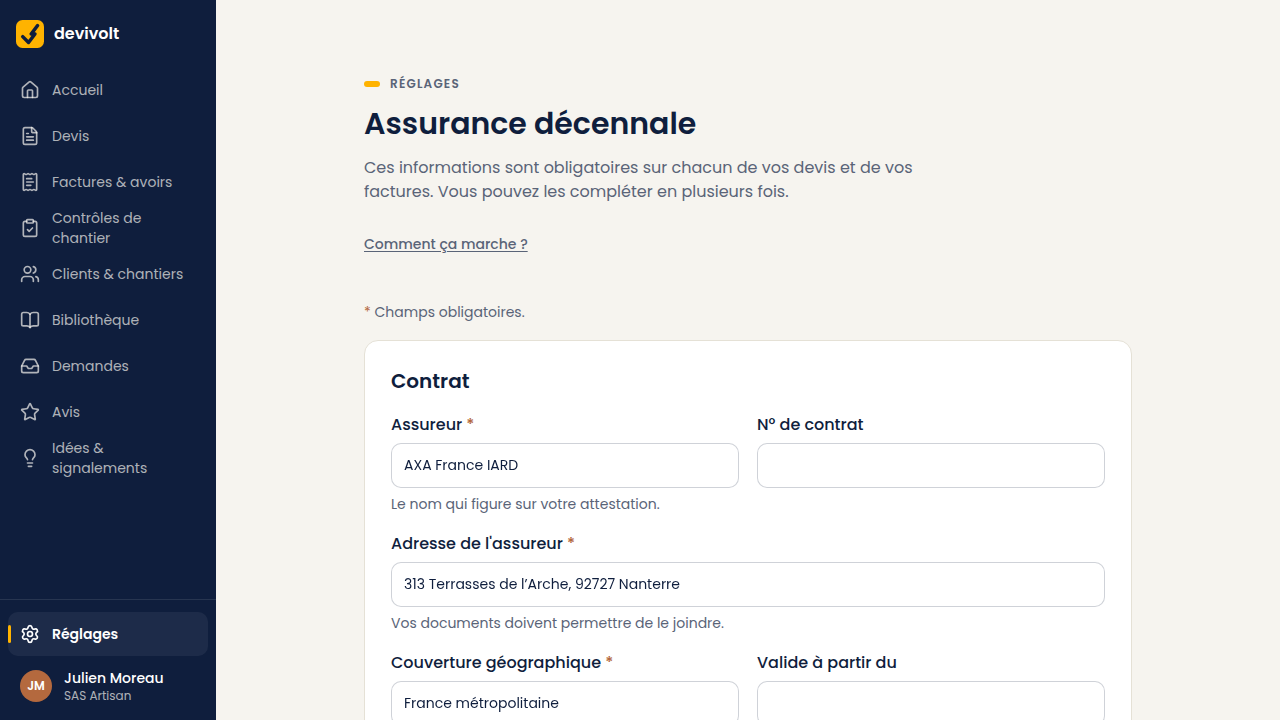
The assurance décennale is the compulsory ten-year liability cover for construction work.
Where to find each detail
Everything is on the certificate your insurer sends you each year.
| Field in Devivolt | Where to find it |
|---|---|
| Insurer | The company name, at the top of the document |
| Policy number | The policy number, often at the top right (optional) |
| Insurer address | Its postal address |
| Geographical cover | The area covered, for example "France métropolitaine" |
| Valid from | The start of the cover, optional: the quote will read "from … to …" |
| Expiry date | The end of the cover, in dd/mm/yyyy format |
Entering and checking
- Copy the fields, then the expiry date in dd/mm/yyyy.
- Save. Devivolt shows: "Policy valid until …".
- You can fill it in over several sittings. As long as a required field is missing, you cannot issue a quote or an invoice.
The insurance is declared on your honor: Devivolt checks nothing with the insurer.
The alert before expiry
- 30 days before the end of the policy, a "Decennial liability insurance" banner appears at the top of every screen: "Your policy expires on …, in … days", with the button Update my insurance. The Settings menu and the More menu also show the countdown ("Ten-year cover · 23 d").
- On the expiry date, you are still covered. The message turns red the next day: "Your policy expired on …".
If the policy expires Devivolt does not block issuing: the red alert stays on every screen until the date is updated. A quote showing expired insurance puts you in a difficult position rather than protecting you: enter the new date before issuing anything.
Renewing
When you receive the new certificate, come back to this screen. Update the policy number if it has changed, and the new expiry date. That is all. The following documents will carry the new details; the old ones keep theirs.